Windows desktop software
WA Bulk Senderv8.5
Send bulk WhatsApp messages from your Windows PC, with account rotation, numbers filter and a groups grabber.
₹799 per year · renew every year at the same price
Works on: Windows PC or laptop
Overview
What WA Bulk Sender does
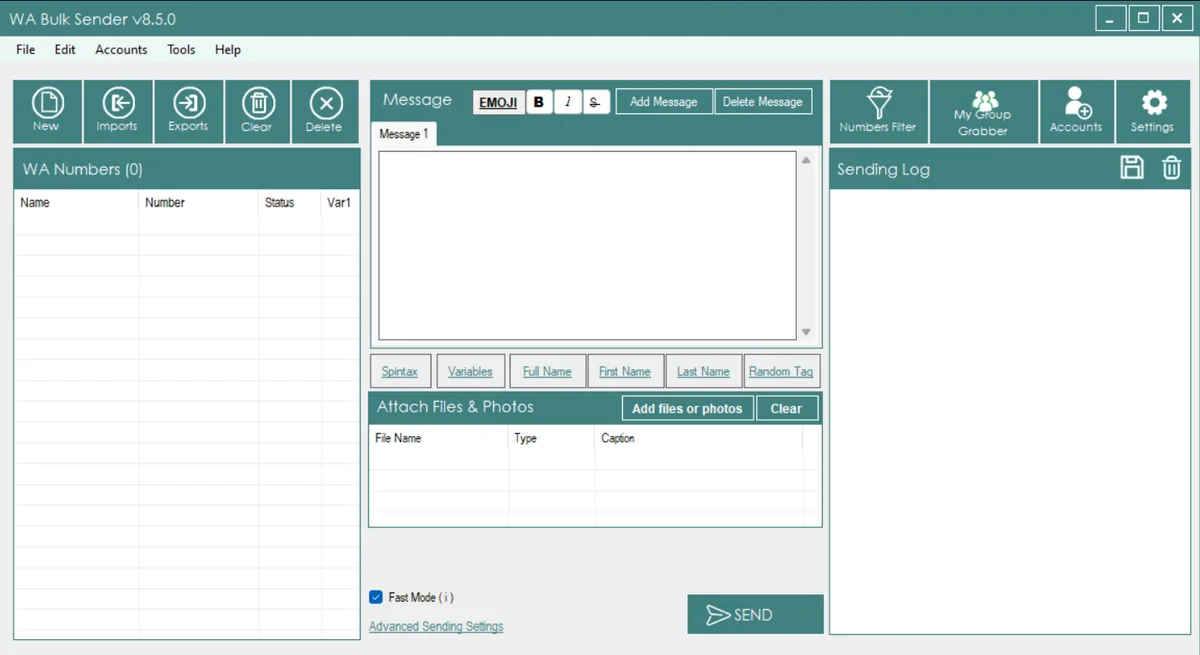
WA Bulk Sender is a Windows program for sending WhatsApp messages to a list of numbers. You load your contacts, write one or more messages, attach files if you want, and press Send. The sending log on the right shows what happened to each number.
It is the plan to pick when your main job is outbound sending: offers, reminders, announcements and follow-ups to people who have agreed to hear from you. It also includes multiple account login and automatic account rotation, so a large list can be shared across more than one WhatsApp number.
Best for
- Shops, institutes and agencies that send offers or notices to a saved list
- Teams that want to spread a large list over more than one WhatsApp number
- Anyone who wants a simple Windows program without a monthly panel
Inside the software
What you see on the screen
These are the real buttons and panels in the screenshot above.
- WA Numbers list
- Columns for Name, Number, Status and Var1, with New, Imports, Exports, Clear and Delete buttons above it.
- Message editor
- Emoji, bold, italic and strikethrough, several messages in tabs (Message 1, 2, ...), Add Message and Delete Message.
- Personalisation tools
- Spintax, Variables, Full Name, First Name, Last Name and Random Tag buttons under the editor.
- Attach Files & Photos
- A table of attachments with file name, type and caption.
- Numbers Filter and My Group Grabber
- Two toolbar buttons to check your numbers and to pull contacts out of your WhatsApp groups.
- Accounts and Settings
- Add your WhatsApp accounts and open the settings screen.
- Sending Log
- A running log of the send, which you can save or clear.
- Fast Mode and Advanced Sending Settings
- A Fast Mode checkbox and a link to advanced sending settings next to the Send button.
Video
Watch WA Bulk Sender in action
A short walkthrough of the program. More videos are on the tutorials page.
Features
Feature guides for WA Bulk Sender
Bulk messaging
Send one message to a whole list, with a log of every send.
Images, PDF, audio and video
Attach photos, PDF files and more, each with its own caption.
Personalised messages
Use names, variables and spintax so every message reads differently.
Button and list messages
Let customers tap a choice instead of typing a reply.
Numbers filter
Clean your list before sending so you do not message dead numbers.
Groups contacts extractor
Pull contacts out of your WhatsApp groups into a list.
Multiple accounts and rotation
Share a large list across more than one WhatsApp number.
Sending speed and delay
Choose how fast the software sends and how long it waits between messages.
Import and export contacts
Bring in your own lists and save them again, with names and numbers.
Sending log and reports
See what happened to every number, and keep the record.
Compare WA Bulk Sender
Does WA Bulk Sender work on Mac?
The program in the screenshot is a Windows application. If you use a Mac, the WA CRM Sender Chrome extension runs inside WhatsApp Web and works on Mac and Windows.
How long does the licence last?
Plans are sold with one year validity and free updates during that year. You renew every year at the same price. The licence is meant to keep working if you format or change your computer; message us if you move to a new PC and need help.
Can I send images, PDF and videos?
Yes. The plan lists text, images and PDF, plus audio and video support. Use the Attach Files & Photos panel and add a caption to each file.
Can I use more than one WhatsApp number?
Yes. The plan lists multiple account login and automatic account rotation.
How do I get the software?
Use the download button on this page, then message us on WhatsApp to buy your licence. We will help you activate it.
Get WA Bulk Sender today
₹799 for one year with free updates, renewed at the same price each year. Message us and we will help you get started.