Chrome plugin for WhatsApp Web
WA CRM Sender
A Chrome extension that adds a Kanban board, tabs, follow-up reminders and broadcasts to WhatsApp Web.
₹1,499 per year · renew every year at the same price
Works on: Google Chrome on Windows and Mac
Overview
What WA CRM Sender does
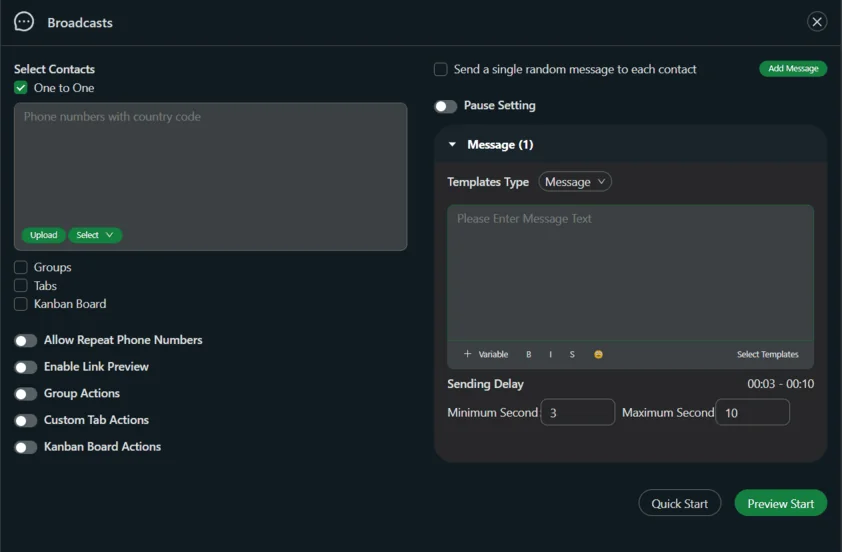
WA CRM Sender lives inside web.whatsapp.com. It adds filters for your chats (unread, favourites, groups, awaiting reply and more) and a Broadcasts panel where you pick contacts, write a message and send with a delay between messages.
It is the plan for people who work from their chats every day: you can keep leads on a Kanban board, organise chats into tabs, set follow-ups and reminders, export groups and chats, and use ChatGPT AI. Because it is a browser extension, it works on Mac as well as Windows.
Best for
- Sales teams and freelancers who manage leads inside WhatsApp
- Mac users who cannot run a Windows program
- People who want follow-up reminders and a Kanban view of their chats
Inside the software
What you see on the screen
These are the real buttons and panels in the screenshot above.
- Broadcasts panel
- Select contacts one to one, by groups, by tabs or from the Kanban board, and Upload or Select numbers with country code.
- Message box
- Templates type, Variable, bold, italic, strikethrough, emoji and Select Templates, plus Add Message and a single random message per contact option.
- Sending delay
- A minimum and maximum number of seconds between messages, and a Pause Setting.
- Options
- Allow repeat phone numbers, enable link preview, group actions, custom tab actions and Kanban board actions.
- Quick Start and Preview Start
- Start the broadcast straight away, or preview it first.
Features
Feature guides for WA CRM Sender
Bulk messaging
Send one message to a whole list, with a log of every send.
Images, PDF, audio and video
Attach photos, PDF files and more, each with its own caption.
Personalised messages
Use names, variables and spintax so every message reads differently.
Auto reply
Reply to incoming messages automatically using keyword rules.
AI chatbot
AI help for replies and messages in Business Sender and CRM Sender.
Groups contacts extractor
Pull contacts out of your WhatsApp groups into a list.
Sending speed and delay
Choose how fast the software sends and how long it waits between messages.
Import and export contacts
Bring in your own lists and save them again, with names and numbers.
CRM, Kanban and follow-ups
Track leads on a Kanban board and never forget a follow-up.
Compare WA CRM Sender
Does WA CRM Sender work on Mac?
Yes. It is a Chrome extension that runs on WhatsApp Web, and the plan lists Mac and Windows.
What is the Kanban board for?
It lets you move chats and leads through stages, for example New, Interested and Closed, so you can see where every conversation stands. You can also target a Kanban column in a broadcast.
Can it send bulk messages too?
Yes. The Broadcasts panel sends to numbers, groups, tabs or Kanban columns, with a minimum and maximum delay between messages.
How do I install it?
Message us on WhatsApp after you buy and we will send you the extension and help you set it up in Chrome.
Get WA CRM Sender today
₹1,499 for one year with free updates, renewed at the same price each year. Message us and we will help you get started.